

At one of our hospital clients, we deployed a new digital workspace built on Omnissa products like Horizon, App Volumes, and DEM. Ivanti Automation Manager was already in use. The EHR system receives multiple updates each month, including hotfixes. Previously, every update required a new image, a time-consuming and error-prone process.
With App Volumes as our Application Layering solution, we gained flexibility. And we went a step further: we fully automated the packaging process.
What we automated
Using PowerShell scripts and an Ivanti Automation Runbook, we automated:
- Creation of Ivanti Automation resources and modules
- Creation of App Volumes Applications and Packages
- Booting the Package VM
- Installing the application into the App Volumes package
- Reverting the Package VM to snapshot
- Marking the package as ‘Current’
- Assigning the package to users
The only manual steps left are entering the HF number and providing the necessary credentials to execute tasks and link them to logging. Everything else runs automatically.

Smart versioning with DEM integration
To stay flexible, we place each application in a folder named after its version. This allows multiple versions to coexist across Test, Acceptance, and Production environments. The correct version is launched via a DEM shortcut using a variable:
C:\Program Files (x86)\Chipsoft\Hix\%HiXPrd%\Chipsoft.hix.exe
C:\Program Files (x86)\Chipsoft\Hix\%HiXAcc%\Chipsoft.hix.exe
C:\Program Files (x86)\Chipsoft\Hix\%HiXTst%\Chipsoft.hix.exe
In DEM, it’s easy to see which environment runs which version. Updating the variable is the only manual step, intentionally kept that way.

And then it broke…
Everything worked as expected. Until after an update, the service desk started receiving calls: the shortcut no longer worked.
Turns out some users had dragged the shortcut from the desktop to the taskbar. DEM translates variables into static paths. Once copied, the shortcut becomes fixed to a specific version. After an update, that path is no longer valid resulting in errors, frustration, and no access to the EHR.

The fix: Files and Folders
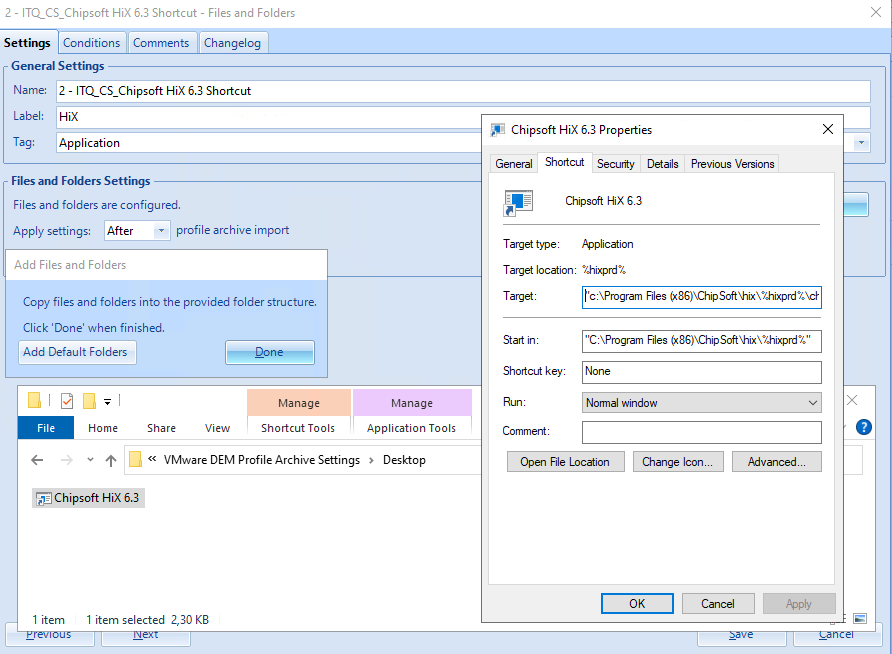
We solved this by no longer using DEM shortcuts. Instead, we use a Files and Folders action to place a file with the correct reference on the desktop and in the start menu. This preserves the variable and ensures the shortcut keeps working after updates.
Conclusion
Technical automation is incredibly valuable. It saves time and boosts reliability. But in the end, it’s all about the end-user experience. For them, it just has to work. That’s where the real value lies.
I’m curious to hear if others have found a more elegant solution to this. Have you tackled similar shortcut issues in a smarter way? I’d love to learn from your approach.